mote_perception
Home for Mote's camera-derived perception nodes, built as staged layers:
L0 (Foundation) — package scaffold, camera health monitor, calibration
plumbing, compressed transport; L1 (Obstacles) — off-board monocular depth
feeding a Nav2 costmap layer; L2 (Semantics) — off-board open-vocabulary
detection feeding object poses to the task layer. This package runs on the
robot (it feeds Nav2), so unlike mote_simulation it is synced to the Pi.
Nodes
camera_monitor— subscribes toimage(remapped to/image_raw) and logs the measured frame rate, resolution, and encoding every few seconds, warning when no frames arrive. Dependency-light (rclpy + sensor_msgs, no OpenCV).depth_obstacle_node— L1, see below.object_detector_node— L2, see below.
Run the launch:
Where things run
The depth (L1) and detection (L2) models are too heavy for the Pi, so each is a
two-process split: a light rclpy node and a torch inference server, talking
over a plain TCP socket (depth_wire.py / detect_wire.py). The split is by
concern, not by machine — which machine each half lands on is a deployment choice:
- The nodes always run on the robot, in its DDS graph, launched by
perception_launch.py. Five of a node's six edges (image, camera_info, scan, tf, and its Nav2/task output) live in that graph; only inference leaves, over one TCP hop. Each node is torch-free and idles cheaply when its server is unreachable (throttled warnings; the detect node doesn't even pull the camera stream until it has labels), so it's safe to leave enabled without a server. - The inference servers run wherever the compute is —
pixi run inferencestarts both (depth + detect) in the torch-onlyinferencepixi env. That's a GPU box, or the robot/dev machine itself.pixi run inference-rocmruns the same pair on an AMD ROCm GPU (the Linux-dev fallback tier; see the L1 section for the iGPU caveats). As a deployed role on a dedicated NVIDIA machine — a gaming PC or a cloud GPU — the same servers ship as a container image (ghcr.io/clachdev/mote-inference), so that host installs no repo, pixi, or scripts: seedocs/inference-server.md. Every variant runs the same supervisor (tools/inference_server.py).
The only knob is inference_host in config/perception.yaml (with the same
$MOTE_HOME/perception.yaml override as the camera calibration): leave it
127.0.0.1 to run everything on one machine, or point it at the GPU box to
offload just inference. The same file's depth.enabled / detect.enabled toggle
each node — turn one off if the Pi can't carry its per-frame CPU cost. Nothing is
passed at launch time.
Check the server from the robot with pixi run inference-health [--host H]
(torch-free — prints each service's model/device/GPU/version, or DOWN), and
measure round-trip latency with pixi run inference-bench (see
benchmarks/). When the server is absent the nodes warn
and skip frames — nav keeps running on lidar alone; the full fallback matrix is
in the inference-server doc.
Note:
perception_launch.pyis a separate process, not part of the mission bringup — runpixi run perceptionalongsidepixi run mapping/robot.
Camera calibration
A committed default calibration (config/camera_info.default.yaml) ships as a
fallback, and a per-robot ~/.mote/camera_calibration.yaml overrides it when
present. Most robots need no calibration of their own — see
config/README.md for when it's worth doing and the
camera_calibration cameracalibrator procedure.
Compressed transport
ros-jazzy-image-transport-plugins is already a project dependency, so the
camera node publishes /image_raw/compressed automatically alongside the raw
stream. Off-board consumers (RViz on a workstation, remote viewers) should prefer
the compressed transport — raw 640x480 @ 30 FPS is roughly 28 Mbps, which
saturates Wi-Fi.
Note: a ros2 topic pub of a fake sensor_msgs/msg/Image will not produce a
/image_raw/compressed topic. Only a real image_transport publisher (the
camera) or an image_transport republish node emits the compressed variant.
L1 — Obstacle perception (off-board monocular depth)
Turns the single RGB camera into a PointCloud2 of obstacles (/camera_obstacles)
for a Nav2 voxel/obstacle layer — catching the low/thin things the 2D lidar plane
misses (cables, thresholds, table & chair legs, a robot vacuum). The lidar stays
the primary, low-latency obstacle and clearing source; this is a slower
supplementary marker.
Live output
On the robot, facing a cluttered floor:
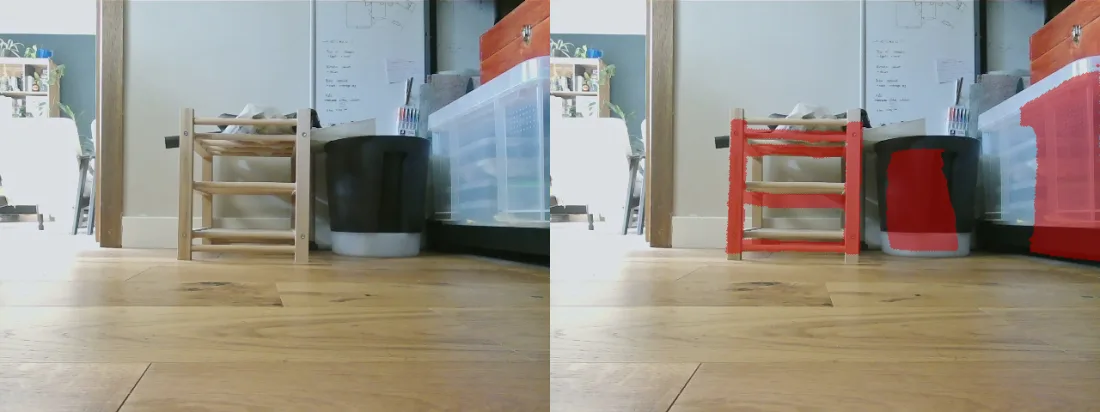
Detection (right) vs. raw camera (left): the stool legs, bin, and a transparent box mark — while the open floor produces no false positives.
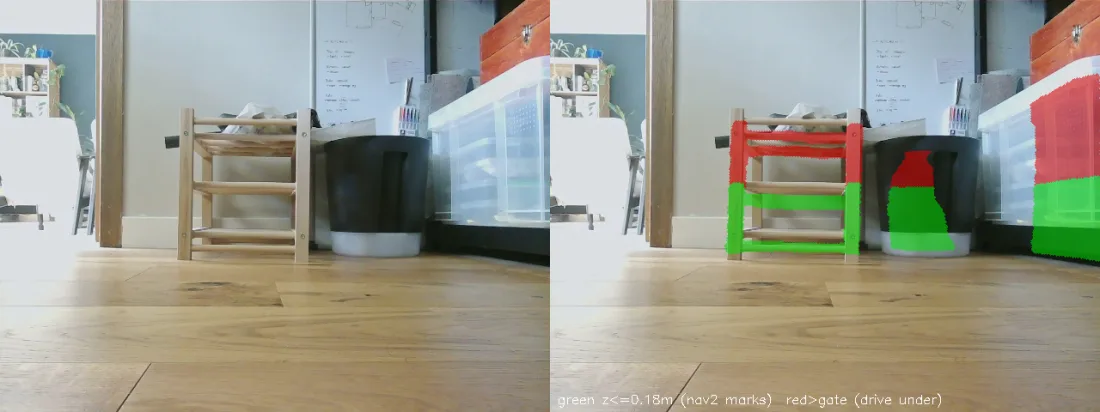
Go-under gate: green (≤ 0.18 m) marks so Nav2 avoids the legs; red is above the robot's height and passable — it paths through the gap beneath a seat or tabletop.
Pipeline: Depth Anything V2-Small (relative) gives a dense disparity map,
inverted to depth. Its scale is arbitrary, so every frame is metrically rescaled
by an affine-in-disparity fit (Theil-Sen) anchored to lidar range returns
(lidar_rescale.py) — the lidar gives metric truth through a chassis-fixed
transform that's invariant to body/floor tilt. When a scan can't constrain the
fit (facing a flat wall, no depth spread) the last good correction is held; before
the first fit the frame is skipped. (An earlier floor-plane scale anchor was
removed: it shifted with floor slope and resting pitch.) The floor plane is then
fit per frame and the cloud rotated level (ground_projection.py) to remove
residual camera tilt, so a point's z is its true height above the floor. Points
above z_obstacle (default 0.02 m) become the cloud, stamped at image-capture
time so Nav2 places it via tf at the moment it was seen (this is how the off-board
latency is absorbed).
Depth inference is too heavy for the Pi CPU (~0.5 s/frame), so it runs off-board. The split is between the two processes, not between two machines — see Where things run:
depth_obstacle_node— light rclpy node (no torch); forwards each compressed frame to the server, rescales, and publishes the cloud. Runs on the robot in its DDS graph, launched byperception_launch.pynext to the camera/lidar/tf it consumes and the Nav2 that consumes its output.tools/depth_server.py— keeps the model resident and serves depth over a socket, in the torch-onlyinferencepixi env (kept out of the ROS/robot env on purpose). Runs wherever the GPU is; the node reaches it over TCP atinference_host.
pixi run inference-rocm runs the servers in the inference-rocm pixi env (torch
from the pytorch.org ROCm wheel index; see pixi.toml) so inference runs on an AMD
GPU. The server picks cuda when torch.cuda.is_available() else cpu — override
with --device cpu|cuda, and --fp16 for half precision (GPU only). On an idle
workstation the iGPU is no faster than the CPU (this small ViT is
bandwidth-bound), but it stays flat under CPU load (RViz + ROS + the obstacle
node) where the CPU-only server degrades to ~1–2 s/frame, and it frees the CPU
for Nav2. It needs a working ROCm GPU: on an unsupported iGPU (e.g. gfx1103) the
env sets HSA_OVERRIDE_GFX_VERSION=11.0.0 to masquerade as a supported target,
and the user must be able to open /dev/kfd (be in the render/video groups).
fp16 and larger models (V2-Base/Large) can crash or hang on unsupported iGPUs —
keep the default fp32 + V2-Small there.
The wire protocol between them (length-prefixed TCP frames) is defined in one
place, mote_perception/depth_wire.py — the spec, the framing helpers, the
DepthClient used by the node and the offline tools, and the reasons a
hand-rolled protocol beats gRPC/ROS for this link are all in its docstring.
Key params: z_obstacle (height deadband, default 0.02 m — below ~1.5 cm floor
noise false-positives), range_min/range_max (default 0.25–1.2 m: the mount's
usable floor band, past which monocular depth compresses into false positives),
server_host/server_port.
Nav2 costmap layer
camera_obstacles feeds a dedicated camera_layer on the local costmap only
(mote_bringup/config/nav2_params.yaml) — near-band and reactive, so it can stop
the robot at a low obstacle without the phantom risk a slow, laggy source would add
to the global plan. It is a separate layer from the lidar obstacle_layer: the
lidar stays the primary marking/clearing source and the camera can never clear a
lidar mark (combination_method: 1 takes the max of the two).
Marks expire on a clock, not by raytracing. The layer is a
spatio_temporal_voxel_layer, not Nav2's VoxelLayer, because this cloud carries
only above-floor points — the node strips the floor to keep the stream off the
Wi-Fi. A voxel layer clears only by raytracing towards a point in a later
observation, so a person who walks through the band and leaves takes their points
with them: nothing is ever observed in that direction again, no clearing ray
crosses the marks they left, and the marks are permanent. clearing: True on the
source was inert over open floor, and publishing floor points would only half-fix
it (rays from the 0.10 m camera descend, so the 0.10–0.18 m band still gets no
crossing). STVL instead expires a voxel voxel_decay seconds (5 s) after the last
time it was marked, whatever the viewing geometry — an obstacle still in view is
re-marked every frame and never expires, one that leaves goes on its own. The
number is a memory-vs-staleness trade: below ~2 s the robot forgets a low obstacle
while steering round it (the camera loses it below range_min 0.25 m, about a
second before the wheels reach it); 5 s is ~1 m of travel at the 0.218 m/s wheel
limit. Frustum clearing (clearing: True plus the FOV parameters) is deliberately
left off: decay already answers staleness, and a mis-stated FOV would clear real
obstacles the lidar plane cannot see. sensor_frame: camera_optical_link still
names the real camera (the cloud itself carries leveled base_footprint
coordinates), which is where that frustum would be anchored.
Two STVL settings are load-bearing rather than cosmetic. clear_after_reading:
True — the measurement buffer holds its newest cloud until something empties it
and every costmap update re-marks whatever it reads, which restamps the voxels with
the current time; without it a departed obstacle is refreshed at 5 Hz forever and
the decay never fires, reproducing the exact bug the layer was swapped in to fix.
And filter: "passthrough" — STVL applies min_obstacle_height/max_obstacle_height
as that filter's z limits, so filter: "none" would silently drop the go-under
gate below rather than just skipping downsampling.
Go-under clearance. The obstacle band has an upper bound so the robot isn't
blocked by things it fits beneath. The camera layer's max_obstacle_height is the
robot's height plus a margin: 0.18 m for the current ~0.13 m chassis (no arm).
A chair seat or tabletop above that is passable overhead and does not mark;
because it is a 3D voxel layer, the legs (which reach the floor) still mark, so
the robot avoids the legs and paths through the clear gap between them. With the
planned arm the robot is ~0.30 m — raise the gate to ~0.35 m; unlike VoxelLayer
there is no separate grid ceiling to raise alongside it. Note the go-under benefit
largely disappears at that height. The node mirrors the gate with a generous
z_obstacle_max publish ceiling (0.5 m — Nav2 is the authoritative gate) so it
doesn't stream points Nav2 discards; the node's z_ceiling bounds only the full
debug cloud.
Near-band false positives measured ≈ 0 on clean floor (including bright/specular
sun-glare floor, the case that defeated the classical spike), and a phantom that
does appear now expires with everything else after voxel_decay.
Live bring-up (the remaining gate — all validation so far is offline against
recorded bags): run pixi run perception on the Pi alongside pixi run
robot/nav, and pixi run inference on the inference machine (both on the Pi via
the default inference_host: 127.0.0.1 if it can carry the CPU/GPU load). Then
check, in order:
1. /camera_obstacles is publishing (~2 Hz) and the camera_layer actually marks
in the local costmap. If it doesn't, the off-board ~0.6 s latency is the first
suspect — raise the local costmap transform_tolerance (the cloud is stamped at
capture, so tf must still hold that stamp).
2. Drive slowly past a low obstacle (cable / threshold / the clothes-horse
cross-bar) and confirm it marks and the controller avoids it.
3. Watch for motion-only false positives: _ground_correct holds the last good
level rotation when a frame's floor fit fails, and a stale rotation applied at a
new pose can tilt the floor above the 0.02 m gate. Static-frame evals can't
surface this; if it appears, tighten plane_max_tilt_deg or the fit gates.
4. Stand in front of the stationary robot until you mark, then step out of shot
and leave it still. The marks must go within ~5 s (voxel_decay) without the
robot moving. If they persist, the buffer is being re-marked — check
clear_after_reading survived whatever edited the layer.
L2 — Semantic understanding (off-board open-vocabulary detection)
Turns "fetch the red box" into a map pose. OWLv2 detects arbitrary text queries — no training, no fixed class list — so the fetch target is whatever the task command names. Same two-process split as L1, with the query riding in each request:
tools/detect_server.py— keeps OWLv2 resident in the torch-onlyinferencepixi env, serving detections over a socket (pixi run detect-server, orpixi run inferenceto run it beside the depth server; protocol inmote_perception/detect_wire.py). Pickscudawhen available (override with--device cpu|cuda); on the CUDA inference PC it runs on the GPU, on CPU it uses all cores.object_detector_node— light rclpy node (no torch). Idles until a label set arrives ondetect/labels(std_msgs/String, comma-separated, transient_local; empty string = idle) — the task layer'sAcquireObjectsets it while a mission needs a pose and clears it after. While idle the node holds no image subscription at all, so it costs neither inference nor a second copy of the camera stream over Wi-Fi. To drive it by hand (debug/demo), the publisher must match the transient_local durability or DDS silently drops the message:Each detection is grounded by dropping the bbox bottom-centre pixel through the floor plane (pixi run -- ros2 topic pub --once --qos-durability transient_local \ /detect/labels std_msgs/msg/String "{data: 'shoe, cup'}"GroundProjector.pixels_to_ground) — the fetch mission's objects sit on the floor, so no depth model is needed in this loop — then transformed to the map frame at the image capture stamp, absorbing the off-board latency the same way L1 does. Poses go out ondetected_objects(vision_msgs/Detection3DArray, map frame);detections(2D boxes) anddetections/overlay/compressed(annotated JPEG) serve debugging/RViz.- The node runs with the rest of perception (
pixi run perception); its OWLv2 server runs withpixi run inference(orpixi run detect-serveralone). Against the sim, first bridge the raw camera into the compressed transport the node consumes (the robot's camera publishes it natively; the gz bridge does not):
Grounding accuracy note: with the camera at ~0.10 m the floor rays are shallow,
so range error grows quickly with distance — metre-scale beyond ~2 m. That is
fine for its job (navigate towards the object; the goal is a standoff pose,
not a grasp), and range_max (default 3.0 m) drops anything farther. Key
params: min_score (default 0.3; the server's --threshold stays low so score
policy lives client-side), range_max, server_host/server_port.
Offline tools
Everything is developed and validated offline against recorded bags
(pixi run record). All run in the dev/default env; the three depth tools need a
server up (pixi run depth-server). Shared bag loading lives in
tools/bag_utils.py; each tool's docstring has the details.
depth_bag_replay.py— re-runs the exact pipeline on a bag; prints per-frame fit diagnostics (the rig that found the RANSAC bistability).depth_bag_eval.py— model accuracy/speed vs lidar, plus side/BEV inspection views; model-agnostic, for comparing depth servers.depth_obstacles.py— decision-level overlay (what marks and why) and the camera-vs-lidar BEV, both point sets transformed intobase_footprint.detect_bag.py— L2 sanity harness: open-vocab detection over a bag's frames, writing overlays with boxes, scores, and grounded floor positions (needspixi run detect-server).bag_overlay.py— geometry sanity check: floor grid + lidar projected into the camera frames.measure_camera_pitch.py— live checkerboard measurement of camera pitch/roll/height (mount calibration).sfm_stage0_geometry.py— multi-view depth feasibility harness (issue #21, Stage 0): parallax across the image, pose-at-stamp accuracy, and usable-baseline duty cycle from a bag's/tf+ images alone (no server, no lidar). Findings indesign/research/sfm_stage0_results.md.
Inference-server tools
Run the servers and operate them from the robot side. See
docs/inference-server.md for the deployment
role and benchmarks/ for numbers.
tools/inference_server.py— cross-platform supervisor that runs every service (theSERVICESlist) bound to0.0.0.0and tears the rest down if one dies; theinference/inference-rocmtasks and the container entrypoint all run it. Add a tenant by adding a row.tools/inference_health.py(pixi run inference-health) — torch-free probe of each service's health/version over the wire;DOWNif unreachable, non-zero exit if any service is down.tools/inference_bench.py(pixi run inference-bench) — torch-free round-trip latency/fps benchmark against a server; writes JSON for the benchmarks dir.tools/prefetch_models.py(pixi run inference-prefetch[-cuda|-rocm]) — warm the HuggingFace cache so the first request doesn't block on a download.tools/model_host.py— on-demand model loading: the servers load on the first request and release the model (and its VRAM) after--idle-timeoutseconds idle, so the inference machine stays usable as a normal PC between missions.tools/probe.py— the deployment's gate, and the one tool that lives inside the image: health plus a real synthetic frame through each service, so a build that listens but cannot infer fails it.inference-healthis its robot-side sibling (same sentinel, but it resolvesinference_hostfromperception.yamland needs yaml, which the image does not carry).deploy/Dockerfile— the inference-server image (depth + detect, CUDA torch, model weights baked in), built and pushed to GHCR by.github/workflows/inference-image.yml. The host runs onedocker run; it never needs the repo. Servers report the image's bakedMOTE_VERSIONin the health blob, soinference-healthwarns on robot/server version skew.deploy/inference-deploy.sh— the update pipeline: probe a candidate on shadow ports while the current version keeps serving, cut over, roll back if the live probe fails. One file on the host, no repo. Seedocs/fleet/server-pipelines.md.deploy/test/(pixi run deploy-test) — that pipeline exercised end to end with stub images that speak the real wire protocol: four checks, a minute, no GPU, on any machine with docker.