Fleet — overlay, identity, control plane, and the operator view¶
The operator runbook for the fleet layer: a network where the LAN/internet
distinction has disappeared (M0), a stable name for each robot (M0), a
server that hands out those names and carries tasks and telemetry to and from
every robot (M1), a browser you watch and drive the fleet from (M3), a
deep console for one robot at a time (M2), and one place that owns every
site's maps (M4). The architecture and the milestones after these are in
docs/design/fleet.md; the measurements are in
m0-verification.md,
m1-verification.md,
m2-verification.md,
m3-verification.md and
m4-verification.md; the two wires are specified in
control-plane.md (MQTT) and fleet-api.md
(HTTP).
pixi run identity |
this robot's id / name / site |
pixi run tailnet |
join this machine to the Tailscale overlay |
pixi run provision |
render cloud-init user-data for a clean Pi |
pixi run dds-check |
DDS participant-slot headroom on this host |
pixi run fleet-broker |
the MQTT control plane, with WebSockets (a container) |
pixi run fleet-server |
fleet API + operator dashboard (fleet box) |
pixi run fleetctl |
operator CLI: tokens, roster, dispatch, audit, watch |
pixi run enroll |
ask the server for this robot's identity |
pixi run agent |
the robot's bridge to the fleet |
pixi run publish-map |
offer this robot's saved map to the registry |
pixi run foxglove |
the robot's remote view + teleop (Foxglove WebSocket) |
First time through, in order: §1a (create the tailnet — browser, once, for the whole fleet) → §1b (join your workstation and the fleet box) → §6 (stand up the fleet server) → §7 (enroll a robot and start its agent) → §9 (open the dashboard) → §10 (connect Foxglove and drive one) → §5 (every robot after this one, unattended from a card). §11 is what to do after a mapping session.
§2 (typing an id by hand) is the M0 path, kept because it is what a robot with no fleet server does; §7 supersedes it and adopts an already-set id rather than renumbering it.
1. The overlay: one tailnet, no port forwarding¶
Every robot, the workstation, the fleet box and the GPU inference box join a
single Tailscale tailnet. WireGuard gives each of them
an encrypted, NAT-traversing link and a stable MagicDNS name, so "same LAN, same
ROS_DOMAIN_ID" becomes "same tailnet" and nothing is ever exposed to the public
internet.
1a. Creating the tailnet — the one-time account setup¶
Four things, all in the browser at
login.tailscale.com, before any machine runs
pixi run tailnet. Ten minutes, once, for the whole fleet.
1. Make the tailnet. Sign up with whichever identity provider you already
use (Google / GitHub / Microsoft / Apple / email). Signing in creates the
tailnet — there is nothing to name or configure — and you get a tailnet domain
like tail1a2b3.ts.net. Everything below lives under that one account. The free
Personal plan covers a homelab fleet comfortably; check the current device and
user limits on the pricing page at signup rather
than trusting a number written here, and note that the plan's tagged-device
allowance is the one that matters as robots multiply (see Cost & tradeoffs in
fleet.md).
2. Confirm MagicDNS is on. Admin console → DNS. It is enabled by default
on new tailnets, and it is the thing that makes ssh michael@mote-01 work — the
device's tailnet hostname becomes its name. Without it you are typing
100.x.y.z addresses everywhere.
3. Declare the tags. Admin console → Access controls, in the policy file.
Tags do not exist until an owner is declared for them, and --advertise-tags on
a machine fails with "requested tags are invalid or not permitted" if you skip
this:
The policy this repo ships is
mote_bringup/tailscale/policy.hujson:
the three tags above, plus the rules that say who may open a socket to what.
Tailscale keeps the policy in its console rather than in a repo, so the file is
the source of truth and the console is a copy — edit here first, then paste:
- https://login.tailscale.com/admin/acls/file
- paste the file, Preview to see what changes, then Save.
Two things it does that the default "everyone reaches everyone" policy does not.
Operators reach a robot's SSH and Foxglove ports and nothing else on it; a robot
reaches the fleet server's API and broker and its inference box's two wire ports,
and no robot can reach another robot — there is no robot-to-robot anything in
v1, so the absence of a rule is the design. The file carries a tests block
asserting exactly that, and Tailscale evaluates it on every save and refuses a
policy that fails one, so the rule is checked by the thing enforcing it.
Do this before joining any machine: --advertise-tags on a tag the policy does
not declare fails with "requested tags are invalid or not permitted", which is
the first thing to check if joining a robot fails.
4. Mint an auth key per robot. Admin console → Settings → Keys → Generate auth key. For a robot:
| Option | Set it to | Why |
|---|---|---|
| Reusable | off | one key, one robot — a leaked key can enrol exactly nothing twice |
| Ephemeral | off | ephemeral nodes vanish when they go offline; a robot must persist |
| Expiration | short (a day is plenty) | it only has to survive from rendering the card to first boot |
| Tags | tag:robot |
this is what makes the key mint a tagged device |
The key looks like tskey-auth-…; it goes into pixi run provision --ts-authkey
(or pixi run tailnet --auth-key on a machine you are sitting at). Keep the key's
tags and the --role you pass in agreement — a mismatch is rejected rather than
merged. The workstation needs no key at all: pixi run tailnet --role workstation
opens a browser to authenticate you.
Why bother tagging the robots, beyond ACLs: a user device's key expires
(180 days by default) and needs a human to re-authenticate it, which for a robot
means it silently drops off the tailnet one day months from now. Tagged devices
do not expire. That failure mode is the practical argument for tag:robot,
ahead of anything the access policy does with it.
1b. Joining machines¶
# on the robot (identity must exist first — its id becomes the MagicDNS name)
pixi run tailnet --role robot --auth-key tskey-auth-...

# on the workstation (a user device, untagged)
pixi run tailnet --role workstation

# on the fleet box / the GPU box
pixi run tailnet --role fleet
pixi run tailnet --role inference
tailscale up is declarative, so re-running is a no-op — the script is safe to
run from provisioning and by hand.
One machine, several roles. A machine is one tailnet node, and tailscale up
replaces the whole tag set — so roles are passed together, never in two runs
(the second would silently drop the first's tag). A home box that is both the
fleet server and the GPU inference node is one call:
pixi run tailnet --role fleet,inference
pixi run tailnet --role fleet,inference --dry-run   # resolve roles/tags/hostname only
Should your dev machine take those roles? Only if you want it to stop being
yours. Advertising a tag transfers the node from your user account to the
tailnet, which needs a re-auth and drops key expiry — so --role workstation and
any tagged role are mutually exclusive and the script refuses the combination.
For one operator at one site, leave the dev machine an untagged workstation that
happens to run Mosquitto and the inference servers: nothing functional depends on
the tag (robots reach it by MagicDNS either way, and inference_host is just a
name). What you defer is the policy's rules — they are keyed on
tag:fleet/tag:inference, so an untagged dev box is reachable under
autogroup:member rather than under the rule written for its role. Tag it when a
second person or a second machine appears and the roles want to outlive your
account.
Verify off-LAN (the M0 acceptance test) — from a device on a different network, e.g. a laptop tethered to a phone:
tailscale ping mote-01          # direct WireGuard path, or via a DERP relay
ssh michael@mote-01             # MagicDNS name == robot id
Once a robot is on the tailnet, its MagicDNS name works anywhere a hostname
does — including pixi run sync, whose target is still the legacy hardcoded
michael@auldbot (pixi.toml). Retargeting it at the robot id is a
one-line change to make when the current Pi is re-provisioned.
The per-device cost curve at fleet scale, and the self-hosted escape hatch (Headscale), are in the design doc.
2. Identity: robot_id is the fleet's primary key¶
Since M1 the server allocates the id — see §7.
identity setremains the way to give a robot an id with no fleet server in the picture, and enrollment adopts whatever it finds rather than renumbering.
pixi run identity set --id mote-01 --name "Scout" --site home
pixi run identity show
pixi run identity id            # just the id, for scripts
writes $MOTE_HOME/robot.yaml (~/.mote/robot.yaml by default):
- The id keys everything downstream: the MQTT topic tree
(
mote/<robot_id>/…), the registry row, and the robot's MagicDNS name. It is constrained to a lowercase DNS label (letters, digits, hyphens, ≤32) because it has to be simultaneously a hostname, an MQTT topic level and a directory name. - It is not the hostname. The hostname is already ambiguous in this repo
(
auldbotinpixi.tomlvsmotein the docs), and re-imaging a Pi must not silently mint a new fleet member. Provisioning does set the OS hostname to the id for convenience, but nothing depends on that. - It is stable across reboots and across updates: the file lives in
MOTE_HOME, outside the package, so an update physically cannot touch it. nameis a free-text label for the robot, so name it like an individual ("Scout") rather than a place ("Front desk") — places are already a concept here, and a robot label that reads like a zone name is a trap when both appear in the same dispatch UI.sitesays which site's map bundles this robot is entitled to. Both are optional to the software.
3. Per-robot state vs shared config¶
The rule, now enforced in one place
(mote_bringup/mote_home.py):
shared config ships in the package; per-robot state lives under MOTE_HOME.
| Shared (package) | Per-robot ($MOTE_HOME, default ~/.mote) |
|
|---|---|---|
| what | identical on every robot of a version | belongs to this machine |
| examples | mote_description/config/robot.yaml (wheel geometry, servo bus, device paths), nav2_params.yaml, slam_toolbox_params.yaml, zones.default.yaml, camera_info.default.yaml, perception.yaml |
robot.yaml (identity), active.yaml (site + floor), sites/… (maps, zones, posegraphs), bags/…, camera_calibration.yaml, perception.yaml override |
| lifecycle | replaced wholesale by an update | survives every update |
| under version control | yes | no |
Two files are called robot.yaml and they are not the same thing:
mote_description/config/robot.yaml is the shared hardware description;
$MOTE_HOME/robot.yaml is this robot's identity.
Where a config has both halves, the per-robot file wins:
mote_home.override("perception.yaml", packaged_default). Launch files use that
helper, so MOTE_HOME is honoured everywhere — which is what lets the sim point
it at an in-repo bundle and tests point it at a tmpdir.
The consequence the fleet layer needs: an update can never clobber identity, site selection, calibration, maps or bags.
4. DDS: pinned to the robot, as of M2¶
DDS never leaves a robot running under systemd. Nothing off-box joins its ROS
graph, because the fleet layer bridges over MQTT (§7) and Foxglove (§10)
instead — so two robots parked on the same LAN cannot see each other's nodes
whatever their ROS_DOMAIN_ID, and there is no domain-id allocation problem at
any fleet size.
M0 deliberately did not flip that switch, because nothing on-robot replaced
an operator's RViz yet and pinning would have broken the one remote workflow
that existed. M2 is what earns it: foxglove_bridge is that off-box path,
and teleop was verified to work with the pin on before the pin was applied
(m2-verification.md §2).
Where it applies, and where it does not:
- the systemd units carry
ROS_AUTOMATIC_DISCOVERY_RANGE=LOCALHOST— everymote-*.service, beside theCYCLONEDDS_URIthey already had. A robot that boots unattended is pinned. It is on all of them rather than just the new one because a localhost-range participant discovers a same-host default-range one but not the reverse, so a mixed set is asymmetric rather than half-safe; - an interactive
pixi runkeeps stock discovery, but it no longer matters for LAN visibility: DDS transport is loopback-only in every pixi environment (cyclonedds.xml, loaded throughCYCLONEDDS_URIby[activation.env]and repeated by the units), because a radio-pinned profile let a wifi flap stall topic delivery between processes on the robot's own board. LAN bench flows (workstation RViz,pixi run teleopfrom a laptop) are gone with it; camera calibration, the one flow that needs a LAN DDS peer, unsets the profile explicitly (mote_perception/config/README.md); - sims and benchmarks pin themselves (
[feature.sim.activation.env]), as before.
The consequence to know: a machine on the LAN cannot see the robot's ROS graph at all — systemd-run or interactive. That is the intended trade — watch it through Foxglove (§10).
The other thing M0 contributed here is the measurement, because the pin has a ceiling worth knowing before we walk into it.
The participant cap — check it before adding processes¶
Under LOCALHOST, rmw_cyclonedds hands CycloneDDS
<ParticipantIndex>auto</ParticipantIndex><MaxAutoParticipantIndex>32</MaxAutoParticipantIndex>:
each participant (one per ROS process, in practice) claims an index 0–32 and
binds UDP ports derived from it. Past 32, participant creation fails, which
means node creation fails.
Measured on the sim nav mission: 17 of 33 slots, stable for the whole run —
and the same 17 under stock discovery, so the tool reads correctly on the robot
as it runs today. The projected robot stack — nav mission with real drivers, plus
perception, plus M1's agent and foxglove_bridge — lands around 24. That is
headroom, but not an unlimited amount, and it is spent before M2 arrives to
claim it. Re-run dds-check whenever a milestone adds processes; if it runs out,
raise MaxAutoParticipantIndex in the robot's existing cyclonedds.xml.
M1's agent has since been measured at exactly one slot, as projected
(m1-verification.md §3). M2 costs two — the bridge
and the teleop relay, which the projection did not know about
(m2-verification.md §3) — putting the full robot stack
around 25 of 33.
Indices are released when a process exits, so what matters is the concurrent
peak; transient helpers (controller spawners, ros2 CLI calls, the ROS daemon)
each take a slot while they run.
5. Provisioning a clean Pi¶
The image is stock Raspberry Pi OS plus one file: user-data on the boot
partition. Raspberry Pi Imager 2.0+ writes cloud-init user-data for its own
OS-customisation, so this replaces that dialog rather than sitting beside it.
Everything up to "boot the Pi" happens on the workstation, against the SD card
mounted there. The Pi runs nothing until it boots; it has no pixi, no network
config and no repo. pixi run provision is a workstation command that writes a
file onto the card — it never runs on the robot. The wifi is configured, by the
template, which is precisely why the Imager dialog is skipped: Imager would write
its own user-data to the same path and one would clobber the other.
The ordering trap — "the robot needs the tailnet to reach the server, but the key comes from the server" — is resolved by making the Tailscale key a provisioning-time secret baked into the image, minted out-of-band by the operator. Nothing is fetched over a network the robot cannot yet use.
Prerequisite: the image must be one whose first boot runs cloud-init.
Raspberry Pi OS gained that with the Imager 2.0-era images; if user-data is
ignored on first boot, that is the thing to check first — none of this has been
run on real hardware yet (see m0-verification.md §5).
- [workstation] Mint a single-use, pre-authorised, tagged key in the
Tailscale admin console (tag
tag:robot, short expiry, ephemeral off). The tag must already exist in the tailnet policy with an owner, or redeeming the key fails. - [workstation] Image the card with Raspberry Pi Imager — choose the OS and the card, and skip the OS-customisation dialog entirely (answer "no" when it offers to apply settings).
- [workstation] Re-insert the card. Imager ejects it when it finishes, so
the boot partition is not mounted any more. Pull it out, put it back, and
check where it landed — usually
/media/$USER/bootfs:
- [workstation] Render
user-dataonto the card:
pixi run provision --id mote-02 --name "Rover" \
    --ssh-key ~/.ssh/id_ed25519.pub \
    --ts-authkey tskey-auth-... \
    --wifi-ssid HomeNet --wifi-psk '…' --wifi-country GB \
    --boot /media/$USER/bootfs
--wifi-country is required with wifi and is not guessed: the Pi's WLAN stays
rfkill-blocked until the regulatory domain is set. Omit the three wifi flags
entirely if the robot is on ethernet.
The output carries a live auth key and a wifi passphrase: it is written 0600
and must never be committed. Print it to stdout first (drop --boot) if you
want to read it before it goes near a card.
- [workstation] Eject the card, so the write is actually on it:
- [Pi] Boot it. With no interactive steps it: brings up wifi; writes
~/.mote/robot.yaml; joins the tailnet asmote-02and shreds the key; installs pixi, clones the workspace and builds it; runspixi run setup(udev, wifi power save, systemd units). - [anywhere on the tailnet] Verify, ideally off-LAN:
First boot takes a while — the build is the long pole, tens of minutes on a Pi.
The robot appears on the tailnet long before it finishes, so tailscale ping
succeeding while ssh has no repo yet is expected. Progress lands in
/var/log/mote-provision.log and /var/log/cloud-init-output.log.
Raspberry Pi Connect stays as the break-glass path, independent of our tailnet and fleet server, so a Pi with a botched key or a broken agent is still recoverable without a keyboard.
Note that step 6 builds from source because the prefix.dev mote channel does
not ship a robot package yet; when it does (M5), that step becomes a pinned
pixi install and first boot gets much shorter. The template is the only thing
that changes.
The template still writes an operator-set identity, as it did at M0. Now
that there is an enrollment endpoint, first boot should call pixi run enroll
with a token instead — a template change that is deliberately left until the
next real Pi provisioning, so the change and its verification land together
(m1-verification.md §5). Nothing breaks meanwhile:
enrolling a robot that already has an id adopts that id.
6. The fleet server¶
Two processes on one always-on box — a VPS, a home server, or a spare Pi: an MQTT broker and the API that serves the registry and the dashboard. Both are ROS-free, so the box needs no robot software.
The fleet box runs them as containers, from
mote_fleet/deploy/ — a compose file, an image and
one script — with docker as the only thing installed on it. That directory is
also where the update, rollback, backup and restore story lives, and it is what
"rebuild the fleet server from scratch" means in practice:
cp env.example .env && $EDITOR .env       # BROKER_HOST = the address robots dial
./fleet-deploy.sh up                      # gated on /healthz answering
./fleet-deploy.sh fleetctl operator new --name you   # dispatch needs one
./fleet-deploy.sh fleetctl token new                 # then enroll a robot
The runbook is server-pipelines.md; what was measured
is ms-verification.md. Two differences from running the
processes by hand: the containers restart themselves, so there are no systemd
units to write (the fleet box is deliberately not covered by pixi run setup,
which provisions robots), and fleetctl runs inside the server container,
because that is where the registry file lives.
The same thing on a workstation¶
For development, or to try the stack before committing a box to it, the two processes run in the foreground:
pixi run fleet-broker                                 # MQTT: 1883, WebSockets: 9001
pixi run -e fleet fleet-server -- --broker-host fleet-box   # API + UI, port 8080
fleet-broker is the same broker as the deployment — the same image and the
same mosquitto.conf, just in the foreground and without the API beside it. It
is not a second way to run the fleet box: the image tag is pinned once, in
docker-compose.yml, and broker.sh reads it from there, so a workstation
cannot end up on a different mosquitto from the one that is deployed.
Why the broker is a container at all. The dashboard (§9) subscribes to the
control plane straight from the browser, and a browser cannot speak raw MQTT —
it needs the broker's WebSocket listener. conda-forge's mosquitto is built
without one. For a box with no Docker there is fleet-broker-local, which uses
conda's binary: robots and fleetctl work exactly as before, and it tells you on
startup that the dashboard will not.
It lives in the fleet environment rather than beside fleet-broker because
that is where the binary it runs comes from — the container needs docker, not an
environment. It is also the only case where the shipped config is not used
verbatim: broker.sh strips the websockets stanza out of a copy, rather than
this repo carrying two configs that can drift.
The reasoning and the measurement are in
m3-verification.md §1.
If the dashboard is blank, suspect this listener first. Mosquitto opens the
MQTT listener and keeps running whether or not the WebSocket one came up, so
robots and fleetctl stay perfectly healthy while the browser has nothing to
subscribe to. The startup log names every listener it opened, which is the
direct answer; the compose healthcheck probes both ports for the same reason.
The rest of it¶
State lives in $MOTE_FLEET_HOME (default ~/.mote-fleet) — the registry
database, the broker's retained messages, and the site bundles the dashboard
draws robots on. That is the server-side analogue of the robot's MOTE_HOME:
redeploying the server software replaces code around it and never the fleet's
memory of who is in it. Under compose those are two named volumes, which is what
fleet-deploy.sh backup snapshots.
--broker-host is the address robots should dial, so on a tailnet it is the
fleet box's MagicDNS name (fleet-box), not localhost — it is handed out
verbatim in every enrollment answer. It defaults to the box's hostname. Under
compose it is BROKER_HOST in .env, and the stack refuses to start without it.
Security, plainly: every /v1 route on the API needs an operator token
(§8), checked by one gate in front of routing rather than by each handler. Four
things are open and each for a reason: /healthz, the static UI, enrollment
(which carries its own token), and the two robot-facing map routes, which carry
no credential because robots have none to carry yet. The broker is still
anonymous, so the dashboard's read path and fleetctl watch connect to it
without one. The tailnet is the outer boundary — WireGuard authenticates, the
policy in §1a says who may reach which port, and nothing here is exposed to the
internet. Do not put the broker on a network the robots are not already trusted
on. Per-robot and per-operator broker credentials are still to come; the shape of
what changes is in
control-plane.md.
7. Enrolling a robot¶
The server owns the id space. A robot presents a token and a hardware fingerprint and is told who it is and where its broker lives.
# [fleet box] mint a token — single-use by default, one token per robot
pixi run fleetctl -- token new

# [robot] exchange it for an identity
pixi run enroll -- --server http://fleet-box:8080 --token tskey… --name Scout --site home
That writes both files the agent needs, and nothing else:
# $MOTE_HOME/robot.yaml                # $MOTE_HOME/fleet.yaml
schema: 1                              schema: 1
id: mote-01                            server: http://fleet-box:8080
name: Scout                            broker:
site: home                               host: fleet-box
                                         port: 1883
Three properties make this safe to run unattended, or twice, or after a mistake:
- Idempotent. The registry keys on a stable hardware id (the Pi's SoC
serial, else
/etc/machine-id, else the MAC), so re-enrolling — after wiping~/.mote, after a failed attempt — returns the same robot, not a second one. - It adopts an existing id. A robot with an M0 operator-set id offers it and the server records it. Upgrading a fleet to M1 registers it; it does not renumber it.
- It refuses to re-key silently. If the server answers with a different id
from the one on disk,
enrollwrites nothing and says so.--forceis the deliberate override.
Then start the bridge:
The agent is not part of pixi run robot / mapping. It reports on the
mission and carries commands to it; folding it into bringup would mean a robot
that cannot reach the fleet server takes its own bringup down with it. It runs
alongside, like the health monitor. If it starts before the robot has enrolled,
it logs and retries — enrolling later brings it up without a restart.
8. Operating the fleet¶
# [fleet box] mint yourself an operator credential, once
pixi run -e fleet fleetctl -- operator new --name michael
export MOTE_FLEET_TOKEN=<that token>

pixi run fleetctl -- robots                             # the roster: who is enrolled, who is online
pixi run fleetctl -- robots mote-01                     # one robot: health, pose, capabilities, last mission
pixi run fleetctl -- watch                              # live: presence, health, pose, status
pixi run fleetctl -- dispatch mote-01 goto target=kitchen   # send a mission
pixi run fleetctl -- dispatch mote-01 fetch target=lab destination=kitchen
pixi run fleetctl -- audit                              # who dispatched what
Dispatch goes through the fleet API, not to the broker. Since M3 the API is
the single write path: it authorizes the operator token, writes an audit row,
and only then publishes to mission/command. The topic tree did not change —
only who may publish to it — so watch, and the status half of dispatch,
still read straight from the broker with nothing in the middle. A token is
minted against the registry file while you are sitting on the fleet box, never
over the network; the name on it is what the audit log records, which is why
an unnamed one is refused. fleetctl operator list|revoke are the other two
verbs, and the route contract is fleet-api.md.
MOTE_FLEET_TOKEN is now needed for every fleetctl verb that talks to the
API, not only dispatch and audit: the roster, the maps and the registry are
operator-only too. Without it they answer 401 and say so. watch is the
exception, because it reads the broker rather than the API.
A mission is a capability and a typed input, not a sentence: the first
argument is a capability key and the rest are key=value pairs (or one {...}
JSON object when a value is not a string). What keys a robot offers, and what
each takes, is the capability set it publishes retained — fleetctl watch shows
it, and the dashboard's dispatch form is generated from it.
dispatch exits 0 only if the mission succeeded, so it composes into
scripts. What comes back is its transitions, tagged with the correlation id the
command went out with:
-> mote-01: fetch {'target': 'lab', 'destination': 'kitchen'}  (id 3e99cf44d1294ab5)
2026-07-26T16:15:35.961Z  dispatched
2026-07-26T16:15:35.963Z  accepted
2026-07-26T16:15:38.305Z  succeeded
A refusal is typed. The class is what you act on and the sentence after it is only the detail:
2026-07-26T16:16:02.114Z  rejected  [unresolved_zone, not retryable] unknown_name: target 'ktichen' is not a place here; navigable zones are dropoff, home, kitchen
2026-07-26T16:16:44.870Z  rejected  [busy, retryable] mission 3e99cf44d1294ab5 (fetch) holds the default lane
Dispatch needs the task layer running on the robot, and pixi run tasks is
deliberately not part of pixi run robot — so a robot happily navigating, in
the roster, reporting ok, can still have nothing subscribed to
task/command. Two things say so. Its retained capability set is empty,
because the agent forwards that set rather than authoring it; and a mission sent
anyway waits 20 seconds and then:
That is the state machine working, not a fault: the agent forwarded the command,
nothing answered, and it freed the dispatcher rather than leaving it watching.
The fix is pixi run tasks on the robot alongside the mission; ros2 topic info
-v /task/command confirms it — a healthy robot has the task server among its
subscribers, not just the bag recorder.
One mission at a time, per robot and lane. A second mission sent while one
is in flight is rejected with failure.class: "busy", naming the mission that
holds the lane. Re-sending the same mission id is safe and re-states its
current status rather than running it again — for an hour after it finished, so
a dispatcher that restarted still learns the outcome. The full lifecycle, and
which half of it the robot enforces and which the agent, is in
control-plane.md.
A mission started on the robot (a bench script publishing to
task/command) appears in watch too, tagged source: local — the fleet
should see a robot that is busy, whoever asked it to be.
Everything except commands is retained, so watch shows you the current
state of the fleet the instant it connects, with no polling and nothing replayed
on request. A robot that loses power is marked offline by the broker itself,
within the keepalive, via its Last Will — not after somebody notices the
heartbeats stopped.
Asking once needs no broker. robots and robots <id> read the fleet
server's own copy of those retained topics over HTTP and print it:
$ pixi run fleetctl -- robots
ID           NAME             SITE       PRESENCE ENROLLED              FINGERPRINT
mote-01      Scout            home       online   2026-07-26T18:41:02Z  serial:d25bff05
mote-02      Rover            -          unknown  2026-07-26T18:44:10Z  serial:8f21ac90

$ pixi run fleetctl -- robots mote-01
mote-01  Scout  (home)
  enrolled   2026-07-26T18:41:02Z  serial:d25bff05
  presence   online
  health     ok: 6 subsystems ok
  pose       x=1.5 y=-2.25 yaw=0.75 (home/ground)
  can do     goto, fetch
  mission    succeeded (goto, id 3e99cf44d1294ab5)
unknown is a third state, not a synonym for offline: a robot that is switched
off publishes online: false through its Last Will and reads offline, while
unknown means nothing has ever been heard from it — or that the fleet server
is not connected to the broker, which both commands say outright when it is so.
Both need the operator token, like every API route. What the detail view shows
of a mission is the last status, because one is all the broker retains; watch
and dispatch are what show every transition, and they keep the broker for
exactly that reason. The route is
fleet-api.md, and it is the same answer
an HTTP-only client — an MCP front door, a script — gets without speaking MQTT
at all.
9. The dashboard¶
fleet-server serves the operator view at http://<fleet-box>:8080/. It is the
fleet-wide picture — who is out there, where they are, what they are doing, and
sending one of them somewhere — plus the one decision the fleet cannot make for
you: which map a floor should be on (the review pane, §11). The deep
single-robot view (3D, sensors, teleop) is Foxglove's job (M2), which each robot
row deep-links to.
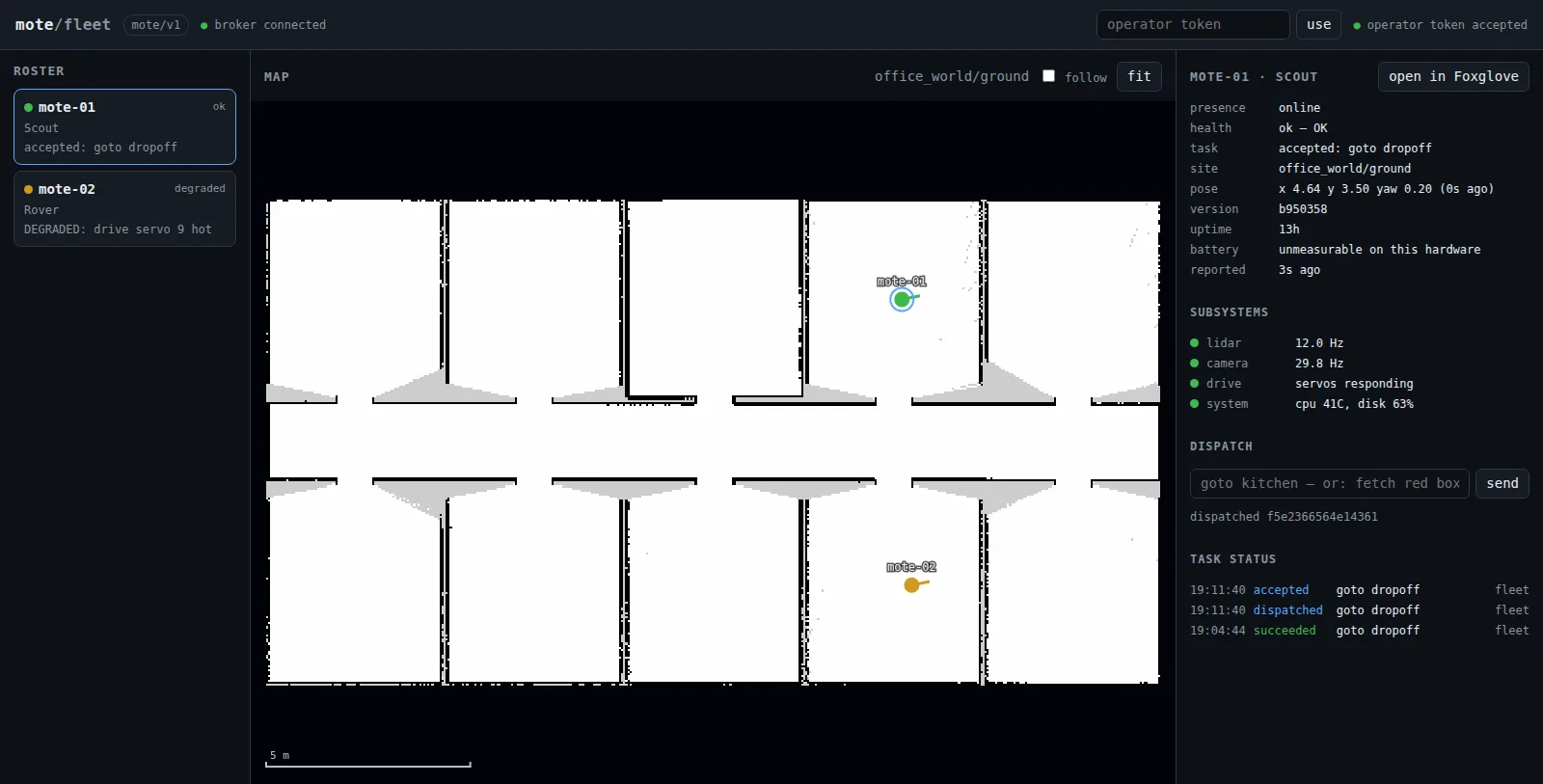
Nothing on the page is polled. The browser subscribes to
mote/v2/+/{presence,health,pose,capabilities,mission/status} over
MQTT-over-WebSockets, and
because every one of those is retained, the whole fleet's current state is on
screen within a second of the page loading — no "wait for the next heartbeat",
no request/response loop, and no service between the broker and the browser.
That is the read path in fleet.md Q5, and it is why the
broker needs the WebSocket listener from §6.
Paste an operator token to see anything at all. /v1/config — what the
page is built out of — is operator-only like every other route, so there is no
read-only mode: the dashboard is signed in, or it is asking to be, and a wall
display whose token was revoked shows the gate rather than a stale fleet. Pasting
a token starts everything without a reload. The token is kept in the browser's
local storage and sent to the fleet API as a bearer credential; the page holds
no broker credential that can publish, and its MQTT client implements no
PUBLISH packet at all.
Each state is said once, by the strongest idiom the page has. The roster
row's dot and its state column already read ok, so the line under them speaks
only on exception — what is wrong (slip detected while turning) or why the
robot stopped answering (offline (connection lost)). The detail pane follows:
ok is the dot's to say and gets no row of its own, degraded and fault get
a banner carrying the message, and a heading with nothing under it —
subsystems on a robot whose health monitor is not running — is hidden rather
than left standing over an empty box.
The detail pane is ranked, not tabulated. Top to bottom: a headline —
state dot, robot id, reported <age> ago, and the link into Foxglove — with the
NOT CURRENT banner directly under it; then mission, the running
capability with its state and how long it has been in it (or the word idle),
and that mission's status log under the line it is about; then dispatch;
then subsystems.
Uptime and the battery are one dim line at the foot of the pane: neither is read
until something else has already gone wrong, and battery reads n/a because
nothing on this robot measures it (control-plane.md). The
pose is not a row at all — the map is the pose display, and nobody reads yaw in
radians. The order is the same in the phone's single column, which is what
makes the age of the state the first thing read and the numbers the last.
The map. A floor's PNG basemap with live robot markers on it: pan by
dragging, zoom with the wheel or by pinching, click a robot to select it,
follow to keep the selected one centred, fit to see the whole floor. The
scale bar is metres.
Only robots on the same site and floor as the selected one are drawn — a pose
from another floor is a different map frame, and drawing it here would place a
robot somewhere it is not.
The server reads basemaps from --maps-dir (default $MOTE_FLEET_HOME/sites),
which is the site bundle layout sites.py already writes — and which, from
M4, robots publish into rather than an operator rsyncing (§11). A robot with no
basemap on the server still appears in the roster with its health and its mission;
the map pane says so rather than drawing an empty grid.
A floor's bound zones are drawn on the basemap: a circle for a radius footprint, an
outline for a polygon, a cross for a bare waypoint, each labelled — so the
goto <zone> targets you can type are the ones you can see. They come from the
canonical revision, in that revision's map frame.
Beside the map's floor label is the canonical revision it is showing, and a button into the review pane — which is where a candidate is looked at, its zones named, and the map promoted (§11). It says how many candidates the floor on screen has when it knows, and it is there either way: above 760 px the tab bar is hidden, so a button that appeared only for a floor with candidates was the sole door to a pane whose whole point is the floors no robot is reporting. The map pane keeps no promote control of its own: this canvas draws robots on the published basemap, so promoting from beside it would mean promoting a map you have not seen.
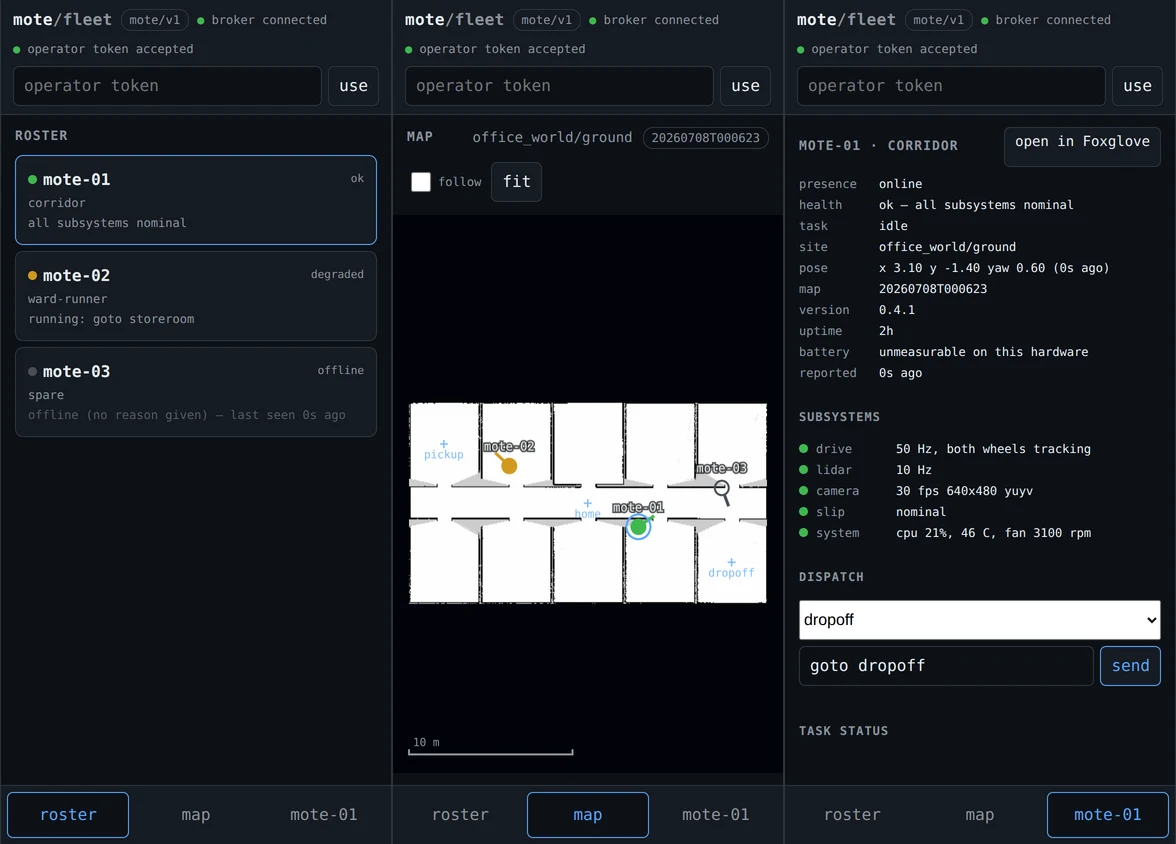
On a phone. The realistic off-LAN client is a phone — it is what an operator has in a corridor, and "where is the robot and what is it doing" is exactly the question you ask from one. Below 760 px the four panes become one at a time behind a tab bar at the bottom of the screen, within thumb reach, so the map gets the whole display instead of a couple of hundred pixels between the roster and the detail pane. Two things follow from losing the side-by-side view:
- Picking a robot in the roster takes you to the map. On a desk that happens for free, both panes being visible; on a phone it has to be done. The third tab is labelled with the selected robot's id, so the selection is legible without switching to it.
- Pinch to zoom, since there is no wheel. One finger pans, two zoom about the point between them, and a two-finger drag carries the map along. Robot markers get a larger hit target when the pointer is a fingertip rather than a cursor.
The dispatch form is generated from the robot's own capability set. It
arrives retained on the broker, so the page knows the keys and the input shapes
without asking; a select lists what this robot offers, and one field appears per
input property. A field becomes a zone picker — the bound zones of the
floor on screen — exactly when its schema $refs zone/v0's zone reference,
which is what that $ref is for. So the page contains no list of capabilities
and no list of which inputs are places, a robot that grows a capability grows
this form, and a keyboard is needed only where the schema really does want free
text.
A robot whose capability set is empty says so in the form rather than offering a box that would go nowhere: retained and empty means the task server is not running.
Between 760 and 1100 px the panes stack and scroll, as before.
Working on the page itself? pixi run fleet-ui-check builds a throwaway
fleet to point it at — a broker, a fleet server, a basemap and three robots that
exist only on the wire — runs the browser checks against it, and tears it all
down; pixi run fleet-ui-check -- --keep leaves it up and prints the URL and an
operator token instead. It uses ports and a state directory of its own, so it
runs beside the fleet you actually operate. Needs a docker and a chrome
(m3-verification.md §2). The checks include the phone
layout above, so the emulated pass is one command too.
What it does not do, deliberately: no marker clustering, no basemap tiling,
no 3D, no camera, no teleop. The first two are what fleet.md Q5 describes for
large sites and would be unmeasured complexity at this fleet size; the last
three are Foxglove's half of the split — §10.
10. Watching and driving one robot: Foxglove¶
The dashboard (§9) is the fleet picture. Foxglove is the deep console for one
robot — live pose on the floor map, the camera, the laser, and a teleop pad —
and it is adopted, not built: foxglove_bridge runs on the robot and Foxglove
connects to it. This is the other half of the split §9 describes, and the
dashboard's per-robot Foxglove button deep-links straight here.
pixi run foxglove                          # by hand, or included in `pixi run robot`
sudo systemctl enable --now mote-foxglove  # to have it always there
Then, in Foxglove: Open connection → Foxglove WebSocket →
ws://<robot-id>:8765 — the robot's MagicDNS name, so this works from
anywhere on the tailnet with nothing exposed to the internet. Import
mote_bringup/foxglove/mote.json once
— Layouts → Import from file… — for the map/camera/teleop/diagnostics
layout; what is in it and why is in
its README.
The bridge is included in the base bringup by default, so any way of starting
the robot gives you something to connect to. Under systemd it is a separate unit
instead — mote-bringup.service passes foxglove:=false — so the view survives
a bringup restart, which is exactly when you want to look at a robot.
Arriving from the dashboard's button¶
§9's roster has an open in Foxglove button per robot. The fleet server holds
the template and the browser only substitutes the id, so the two halves meet at
one string (--foxglove-url, fleet_server.py):
That is the same connection as typing it by hand — robot_id is the MagicDNS
name (§2) and 8765 is this bridge's default port — so the button needs no
agreement beyond those two facts. Three consequences worth knowing:
- It opens the desktop app, not a browser tab.
foxglove://is a scheme the installed Foxglove application registers with the OS; a machine without it does nothing visible when the button is clicked. The hosted web app takes the same parameters athttps://app.foxglove.dev/~/view?ds=…instead, but a page served over HTTPS will not open a plainws://socket — browsers block that as mixed content — so reaching this bridge from the web app means giving it TLS (tls/certfile/keyfile, whichfoxglove_launch.pyleaves at the node's defaults). Desktop is the path that works without a certificate. (Reasoned from the mixed-content rule, not measured — seem2-verification.md§5.) - The link carries the data source, not the layout. Foxglove's deep links can
name a layout, but only by an id from the operator's own layout store, so there
is no value this repo could ship. Import
mote.jsononce per Foxglove install and the button lands on it thereafter; skip that and it opens whatever layout was last active. - Change the port and you must change the template. Running the bridge on
another port (
pixi run foxglove port:=9000) leaves the dashboard pointing at 8765;fleet-server --foxglove-urlis the one place to fix it, and--foxglove-url ""hides the button entirely.
Driving it¶
The Teleop panel's arrows drive the robot. Four things are worth knowing before you use it on hardware:
- It publishes
/cmd_vel_teleop, not the controller's topic. Foxglove can only emit unstampedgeometry_msgs/TwistandDiffDriveControllertakesTwistStamped, so a smalltwist_relaynode adds the header — on the robot, which keeps your clock out of the safety path. - Letting go stops the robot, and so does losing the link. Commands simply
stop arriving and the controller's
cmd_vel_timeout(0.5 s) halts the wheels. There is no remote e-stop and no safety-rated teleop here — all safety behaviour is local, by design. - It pre-empts an active Nav2 goal. Both sources feed a
twist_muxon the robot and teleop outranks navigation, so the first arrow you press takes the wheels; there is no need to cancel the task first. Release and Nav2 gets them back a second later — after the robot has come to a stop, because the mux keeps navigation suppressed for longer than the controller's deadman. - A takeover overrides the goal, it does not cancel it, so the robot resumes
what it was doing. To stop that, use the layout's Publish panel to send
{"data": true}on/pause_navigation;falsereleases it. Held off the wheels while stationary, the goal fails Nav2's progress checker after ~10 s and the task reports failed on the dashboard.
If it will not connect¶
- HTTP 400 at the handshake — the client is offering only the old
foxglove.websocket.v1subprotocol. Bridge 3.3.0 speaksfoxglove.sdk.v1; current Foxglove negotiates it automatically, older builds and hand-rolled clients do not (m2-verification.md§1). - Nothing on the topic list — the bridge is up but the mission is not. The bridge serves whatever graph exists, including an empty one.
ros2 topic liston your workstation is empty, but Foxglove works — that is the DDS pin (§4) doing its job on a systemd-run robot, not a fault.
Bandwidth is demand-driven: the bridge only serialises topics a panel has actually subscribed to, so hidden panels and unopened topics cost nothing, and the camera streams compressed only while you are looking at it. Over a relayed tailnet path the camera is still the first thing that will saturate.
11. Maps: publishing what a robot mapped, promoting what the fleet uses¶
The fleet server is the canonical registry of sites, floors and map
revisions (M4, fleet.md Q4). The whole flow is two
commands and one rule.
Uploading is not publishing. A revision a robot uploads is a candidate: validated, stored, recorded, and changing nothing. Promoting one is an operator's decision, and it is what tells every robot on that floor to pull it.
After a mapping session¶
# [robot] map the floor as always, then save it locally
pixi run mapping                  # drive it; ...or `pixi run sim-mapping`
pixi run save-map                 # -> ~/.mote/sites/home/floors/ground/maps/<rev>/

# [robot] offer it to the fleet
pixi run publish-map
#   published home/ground/20260728T090412 to http://fleet-box:8080 (186349 bytes)
#   it is a candidate; home/ground is still on 20260727T101500.
#   an operator promotes it with: fleetctl promote home ground 20260728T090412
save-map and publish-map are separate on purpose: saving is a local,
offline act that must work on a robot that has never seen a fleet server, and
chaining them would make the first fail when the second cannot happen. Publish
whenever the robot is back on the tailnet.
save-map now also runs the fleet's own validation locally, so a map that would
be refused by the server is refused on the robot while the mapping session is
still up and you can just map again.
Promoting one¶
# [operator] what has each floor got?
pixi run -e fleet fleetctl -- sites
# SITE             FLOOR      CANONICAL          CANDIDATES
# home             ground     20260727T101500    20260728T090412

# [operator] look before you leap: validation, provenance, zones
pixi run -e fleet fleetctl -- sites home ground
# home/ground  canonical: 20260727T101500
#   * 20260727T101500     ok        mote-01    2026-07-27T10:21:44Z  2 zones
#     20260728T090412     ok        mote-01    2026-07-28T09:04:31Z  2 zones

# [operator] make it the floor's map
pixi run -e fleet fleetctl -- promote home ground 20260728T090412
#   home/ground -> 20260728T090412  (sha256:6f1c…)
#   announced on mote/v1/registry/site/home/floor/ground/current (retained); agents will pull it
Reviewing one before you promote it¶
fleetctl sites <site> <floor> tells you a revision is valid. It cannot tell
you whether it is the map you want, and for a long time neither could the
dashboard: the promote picker listed candidates as timestamps and the canvas
beside it was always the published basemap, so a promotion was an act of faith
in a filename. The dashboard's review pane is where that decision is now
made.
Open it from the tab bar, or from the map pane's N candidates — review button,
which appears whenever the floor on screen has something waiting. It shows:
- A site/floor picker of its own, fed by the registry rather than by which robot is selected. The floor worth reviewing is often one no robot is reporting — mapped by a robot since switched off, or side-loaded.
- Every revision of that floor, newest first, the published one included so you can see what you would be replacing. A revision the validator refused is listed too, with its reason, because "why can I not promote the map my robot just published" is a question this pane should answer.
- The candidate's own map, drawn from that revision's own image — not the published one — with its own zones over it. Switching between two candidates keeps the viewport, which is how you compare them.
- Why it is promotable: the validator's verdict and warnings, plus where the revision came from, when it was mapped, its size and resolution, the free/ occupied/unknown split, whether it carries a posegraph (i.e. whether mapping can be continued in this frame), its bytes and digest.
- The zones in it, and — the part that is easy to miss — an
inheritedmark beside the heading when they are not the revision's own. A revision that carries no zones is drawn with the floor's, bound in a previous session's frame: they draw perfectly over the new map and are out by however far the two origins differ, which the canvas cannot show. Zones that belong to the map they are drawn on are marked nothing at all — that is what "zones" means. - The promote button, which is the same audited flip
fleetctl promotemakes.
Everything except that button and the zone editor below is a read. Nothing you do here changes any floor until you promote.
Leaving it is back to map in the pane head, or Escape. Review is a mode
rather than a fourth column — it stands the operations panes down at every
width — and the tab bar exists only below 760 px, so on a desk the pane's own
head is the way out. Both are held off while a zone edit is up, as the revision
list is: an edit has no autosave, so cancel (or save as candidate) ends it
first. A promotion leaves for you when it was made on the floor the map pane is
already showing — where the new revision is what that pane then draws. Promote
any other floor and the pane stays up: the map pane follows the selected
robot's floor, so leaving would land you on an unrelated map, and on a floor no
robot is reporting — the case this pane exists for — the note saying what
happened is the only evidence there is.
Naming the rooms on it, before you promote it¶
pixi run segment-map finds the rooms of a map but cannot know what they are
called, so a fresh revision arrives with zone_01..zone_07. edit zones,
beside the zone list, is where they get their names — on the candidate's own map,
where you can see which room is which.
The controls are the map and the list together:
- On the map: drag a vertex to follow a wall, drag a zone to move footprint and pose together, drag a pose cross to move where the robot is sent, double-click an edge to add a vertex or a vertex to remove it. A polygon needs three, so the last removal is refused rather than quietly making a line. Whatever the next press would take is highlighted under the pointer, and the cursor says which it is: a crosshair over a vertex, a move cursor over a pose or a zone body, and the map's own grab cursor everywhere else — where a drag pans instead of editing.
- Everything you drag lands on a pixel centre — the map's own grid, so two zones meant to share a wall share the same numbers, and a coordinate never claims precision the map does not have. A whole zone moves by whole pixels, so a traced room keeps its shape. Hold shift to move freely, for the rare case that wants a coordinate between two pixels. Only what you drag is snapped, whoever put it there — a pose a robot measured by driving to it and one an earlier edit placed are alike in being already recorded — while an outline this editor invents starts on the grid. Drag a pose and it does snap: a drag is a fresh coordinate, with the map's precision and no more.
- What you move stops claiming a robot drove there. Each zone's coordinate
records how it came to be —
taughtwhen a robot was driven there andsave-zonecaptured the pose,derivedwhensegment-mapread it off the map — and that is what tells whoever looks next whether a re-map invalidates it. Anything you place or drag here is neither, so it is saved asexternal, stamped with your operator name and the server's clock. A zone you did not touch keeps what it had, so a segmented room staysderiveduntil somebody reshapes it. - It is the same list either way. The zones of a revision are listed under
the map whether or not you are editing them — the name, then whether it is a
point or an area — and
edit zonesputs controls into those rows rather than replacing them with a second list. Nothing moves when you click it: the rows stay where they are and the controls arrive in cells that were already there. - A row is a list you pick from: the name selects that zone, and beside it
the shape it has —
point 1.20, -3.40, orarea · 4 corners.⌖appears only for a zone with no pose at all (a segmented room is an outline, so there is no cross to drag) and arms the next map click as its pose.×deletes the zone;add zone, the last line of the list, drops a square at the view centre to be dragged into shape and named. - Where a control sits says what it acts on.
save as candidateandcanceltake the place ofedit zonesabove the list, because they end the edit that button began;add zoneis in the list, because that is what it adds to. What the save says — a refusal, or the candidate it wrote — appears under the list, in room the list gives up as the message arrives, and stays until another revision is opened. - Selecting a row shows that zone's record beside the list, under details — and a zone is always selected, so it is always showing something. Three rows, in both states: the name, the note, and the pose. Text when you are looking, inputs when you are editing, in the same rows either way. The note is the field you read before deciding whether to edit anything, which is why the column does not wait for an edit to appear.
A zone is a place-name: a human name bound to geometry. The name is what the
place is called and what goto takes — store room, Café, spaces and accents
and all; there is no second machine name to keep in step with it. The note is
free text for what the name cannot say: stationery lives here, not in the
office. Between them that is the whole record, because the mission layer's
resolver already knows what a store room is, and the note is the only part it
could not have guessed. Other names a place answers to go in the note — the
resolver reads the sentence, so there is no alias list.
Geometry is a property, not a type. A zone has a pose, and it may also have
an extent. The row says which: a point is somewhere to drive to, an area is
a place with walls, and "am I in it" is the question that one exists to answer.
add zone gives you an area to drag onto the walls; ⌖ gives an outline a pose.
Two places called the same thing is refused before it is saved — the robot's loader refuses a vocabulary where one query answers to two zones rather than picking by luck, so the editor must not produce one. So is a name with a space at either end, which looks identical to one without and resolves differently.
Saving derives a new candidate: save as candidate sends the edited set,
and the server re-packs the revision you were editing with those zones in place
of its own. The revision you edited is untouched — including when it is the
published one — and the new candidate is selected in the pane, so the zones on
screen afterwards are the saved ones read back from the server. Promote it when
it looks right. Two consequences worth knowing:
- Iterating costs a candidate each save. Editing a candidate derives from it, so a floor's list grows while you work; the registry keeps the canonical revision plus the five newest candidates, so the intermediates fall off on their own.
- A revision that inherited the floor's zones stops inheriting. The saved candidate carries them, which is what you want: inherited zones were bound in another session's frame, and dragging them onto this map is the correction.
cancel discards the edit. There is no autosave and nothing is written until
you save, so an edit you are unsure about costs nothing to abandon.
A floor with nothing published yet works the same way — which was not always true: the dashboard used to fetch a floor's revisions only after its basemap had loaded, so a floor whose only revisions were candidates listed none of them and its first promotion could not be made in a browser at all. Reviewing and promoting the first map on a floor is now the ordinary path.
What the robots then do¶
Each agent subscribes to mote/v1/registry/site/+/floor/+/current. Because that
topic is retained, a robot that was switched off through the whole mapping
session is told the moment it reconnects — there is no polling and no
missed-update case. An agent acts on the floor it is on plus floors it already
holds, ignores the rest of the fleet's, downloads the revision, checks its
digest, stages it in a temporary directory, renames it into maps/<rev>/ and
flips its local map symlink. A half-transferred revision is never visible.
A revision carries a copy of the floor's zones. The floor owns them — a zone
is a coordinate in the floor's frame and a revision is an estimate registered
into it — but the revision is how a floor's places reach a robot that has never
driven there, and the copy inside the revision an operator promoted is the
fleet's current answer. Installing one therefore replaces the floor's
zones.yaml, keeping the one it replaces beside it as zones.<old-rev>.yaml.
The running navigation stack keeps the map it loaded. Nav2's map_server
reads the map at startup, so the flip takes effect on the next pixi run robot
(or systemctl restart mote-bringup). The agent logs restart nav to load it,
and each robot's health carries the revision it is actually running — which is
how the dashboard shows a robot that has not picked the new map up yet.
Two robots mapped the same floor¶
Nothing is merged, and nothing is lost. Both are candidates, an operator
promotes one, and the other is retained. This is not a limitation to fix: a map
frame's origin is an accident of where SLAM started, so silently merging two
frames would break every bound zone coordinate. If both robots proposed the
same revision id (they are per-second timestamps), the second is stored as
<rev>-2 and fleetctl sites <site> <floor> shows which robot uploaded which.
Rolling back¶
fleetctl promote an older revision. It is the same flip, so rollback costs
what promotion costs. The registry keeps the canonical revision plus the five
newest candidates per floor; the canonical one is never pruned, however old.
Seeding from a robot without publishing¶
Still possible, and still just files — the registry's on-disk layout is the site bundle layout:
(-L because the published revision is reached through a symlink.) A floor
seeded this way serves basemaps normally, but cannot be promoted onto until its
map/ is a symlink into maps/<rev>/ — the API answers 409 rather than
overwriting a directory it did not create.
12. Zone names: what a dispatcher may say¶
Everything in §11 is about the map. This is about the names, which are a different kind of fact and travel differently.
A zone is two documents. Its pose is a coordinate in
one robot's map frame, and that frame's origin is wherever that robot's SLAM
session happened to start — so (2.0, 3.5) on mote-01 is a different
physical point from (2.0, 3.5) on mote-02, and no fleet-level transform
fixes it. Its name, though, is true for every robot at the site. So the fleet
serves the names and never the poses:
curl -s http://fleet-box:8080/v1/zones | python -m json.tool          # every floor
curl -s http://fleet-box:8080/v1/zones/home/ground | python -m json.tool
{"schema":1,"site":"home","floor":"ground","revision":4,"zones":[
 {"name":"the kitchen","note":"the good kettle is in the store room",
  "navigable":true}],
 "problems":[]}
This is what to point a dispatcher at — anything turning "take it to the
kitchen" into goto kitchen. It carries no coordinates because a caller of this
route has nothing to draw one on, not because a coordinate would be wrong. The
route that does carry them is /v1/maps/<site>/<floor>/zones.json, and it is
for the thing drawing zones on the basemap, which already has the basemap.
Teaching the vocabulary¶
A zone is a place-name: the name is what the place is called, and the note is
what the name cannot say. save-zone takes both, and quote a name with spaces
in it:
pixi run save-zone "the kitchen" --radius 1.5
pixi run save-zone "store room" --note "stationery lives here, not the office"
pixi run save-zone sluice --radius 0.8 --no-navigable
--no-navigable marks a place a robot must not be sent to — goto sluice is
then refused by the robot rather than driven to. Capturing a pose again
(save-zone "the kitchen") keeps the note and the flag: a better coordinate is
not a rename.
Other names a place answers to belong in the note. There is no alias list: the mission layer's resolver reads free text and already knows what a store room is, where a hand-maintained list of spellings was one more thing to keep in step.
pixi run segment-map gives every candidate it proposes a footprint and nothing
else; the names it invents (zone_01…) are placeholders for you to replace, in
the dashboard's zone editor or by hand in the floor's zones.yaml:
zones:
  the kitchen: {x: 2.0, y: 3.5, yaw: 1.57, radius: 1.5,
                note: the good kettle is in the store room}
A floor written before place-names still loads unchanged: its
kind, display_name, aliases, parent and tags are accepted and dropped,
its description is read as the note it was, and kind: keepout still means
navigable: false. What it loses is alias matching — goto galley no longer
reaches a zone named kitchen.
When problems is not empty¶
The server reports a broken vocabulary rather than refusing to serve it — the map is unaffected, and a floor's basemap must not stop being served over two rooms called the same thing. Two things show up there:
- two zones answering to one query. Nothing may pick between them, so the
name is unusable until you fix it. The robot's own loader refuses such a
file outright, so this one will also stop
task_serverstarting: fix it before it reaches a robot. - a name nobody could have meant, e.g. one with a space at either end: it
looks identical to the same name without and resolves differently.
Caféandstore roomare not problems — they are what the places are called.
A file with no coherent reading at all — a legacy keepout marked navigable:
true, a navigable that is neither true nor false — is refused at the parse,
by save-map locally and by the server on upload, so it never becomes a
candidate.